Your GLP‑1 history on one page.
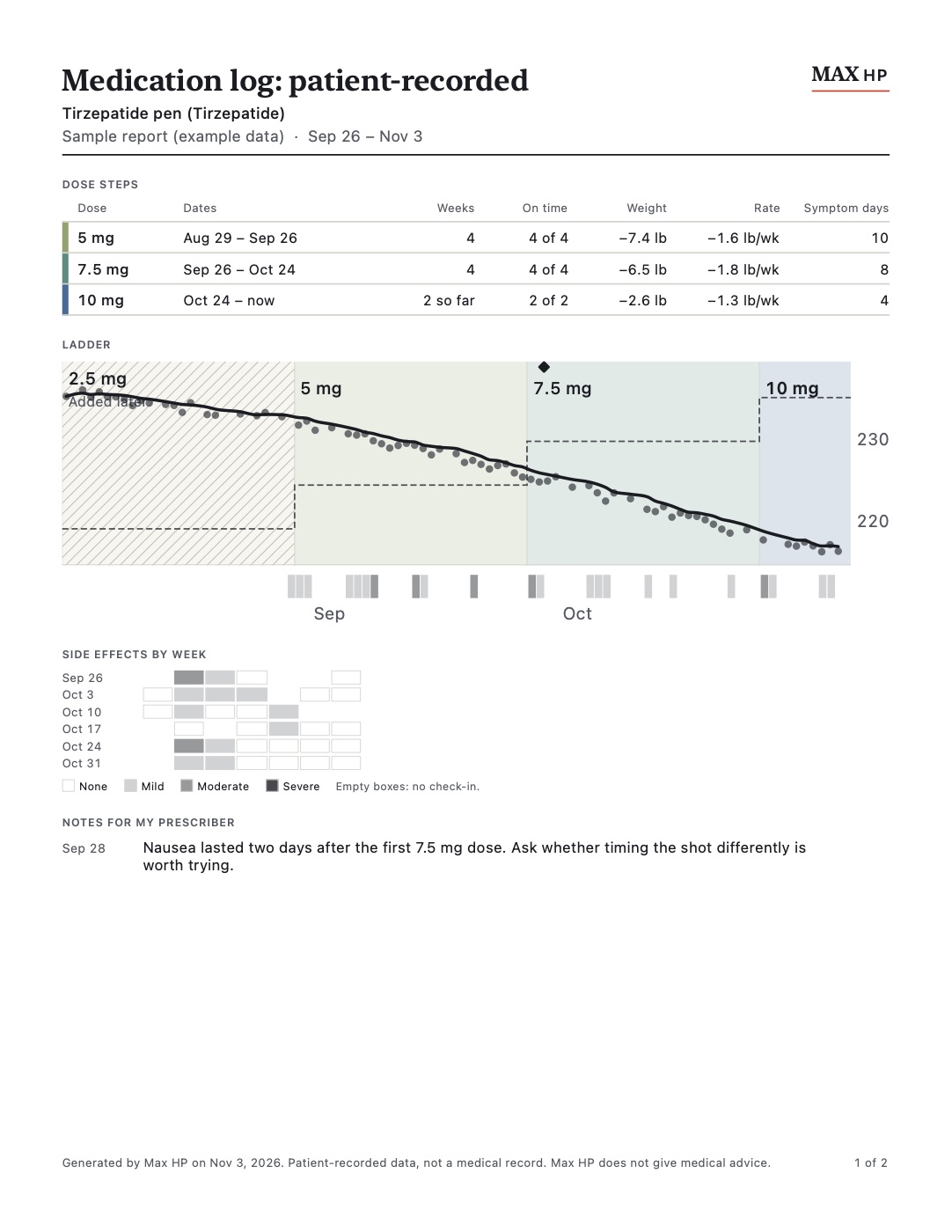
The Clinic Report is a PDF that Max HP, a GLP‑1 dose tracker for iPhone, makes from your log. Page one sums up each dose step: dates, doses on time, weight change and side‑effect days, with the Ladder chart. The pages after it list every dose. It’s for the appointment where your prescriber asks how the last dose went.
What’s on the report
- Dose stepsOne row per step: the dose, the dates, how many weeks, doses on time, weight change, weekly rate and symptom days.
- The LadderYour dose steps as a staircase, with weigh‑ins and a 7‑day average line, and the days you flagged side effects.
- Side effects by weekA grid of none, mild, moderate or severe for each day you checked in. Empty boxes mean no check‑in, so a gap never reads as “fine”.
- Notes for your prescriberAnything you wrote down to ask about, with its date.
- The dose logFrom page two: every dose, with the time, site and what you noted.
The title says what it is: “Medication log: patient-recorded”. Each page’s footer says the data is patient-recorded, not a medical record, and that Max HP doesn’t give medical advice.
You choose what goes on it
- The date range, which starts from your last report.
- Whether to include weights, symptoms, injection sites, supply and notes.
- Your name, or no name at all.
- US Letter or A4. It prints clearly in black and white.
If you hide weight numbers in Max HP, the report hides them too.
Why it’s organised by dose step
Each GLP‑1 dose change is a decision you and your prescriber make together, usually after a few weeks on the dose before. A list of shots doesn’t answer the question that decision turns on: what happened on this dose, compared with the last one?
Grouping the log by step does. Each row is one dose, so the rate, the side‑effect days and the missed doses for that dose sit side by side. How dose steps work in Max HP.
What the report doesn’t do
- It doesn’t suggest a dose or say whether to change one. That’s your prescriber’s decision.
- It isn’t a medical record, and it doesn’t go to anyone unless you send or print it.
- It only knows what you logged. Gaps show as gaps.
Questions
- Is the Clinic Report free?
- It’s part of Max HP Pro. On the free plan you can preview it, with a watermark. Pricing.
- How do I give it to my prescriber?
- Max HP makes a PDF. Print it, show it on your phone, or send it through your clinic’s patient portal or email. It goes only where you send it.
- Does it work for pills and compounded medication?
- Yes. Pills and compounded vials are logged by dose step, the same as pens. For compounded medication, the report shows what you entered, as your prescription states it; Max HP never converts units to milligrams.
- What if I started before I used Max HP?
- You can add earlier dose steps during setup. They show on the report, marked as added later, so it’s clear those doses weren’t logged at the time.
- Can I bring a printed log instead?
- Yes. The free appointment checklist and tracker template work on paper.
Updated